What it is#
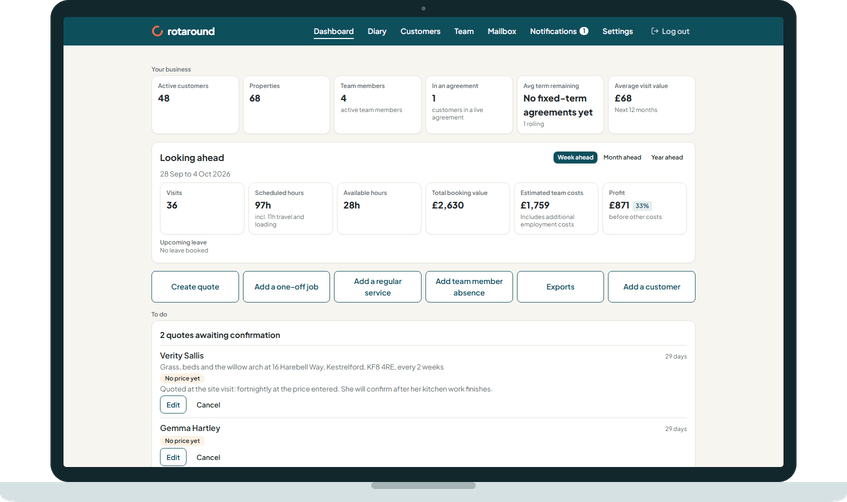
Things that need you should not wait to be found. The To do section on the dashboard gathers them into cards. Each card shows only when it has something in it, and the whole section hides when there is nothing to do.
When to use it#
Check it each time you open the dashboard. Work down it from the top.
How to do it#
The cards, in order:
- Quotes awaiting confirmation: One row for each quote, with the customer, how long it has waited and a short summary. Press Chase, Confirm, Edit or Cancel. A lead with no price yet shows No price yet.
- Visits that need your decision: Press the card to open them and choose what to do with each.
- Unread replies: Customer replies waiting in your Mailbox.
- Team member sickness and leave: A team member who reports sick shows with Cancel their day, or Record the absence on a day with no visits, and Dismiss. A leave request shows Approve and Decline.
- Visits due with nothing on the diary: in self mode only, customers with visits due this week and nothing placed. Place them now.
- Visits waiting to be scheduled: It shows how many are to be rescheduled and how many are to be placed, and opens Waiting to be scheduled.
- Drafts not finished: Quotes, jobs and services you started but have not added or sent. It opens your drafts.
- Customers due a price review: It counts customers, not properties, and opens the Price reviews page.
- Agreement reviews due: Send each rise notice from the Agreement reviews page.
- Ready to send: Agreement updates and rises prepared for you. Review, change or cancel each one before its date, then send it.
What your customer sees#
Nothing from the cards themselves. A customer hears from you only when you act, for example when you press Chase on a quote or send a price update.
What happens next#
A card's count drops as you deal with each item, and the card hides at zero. When you confirm a quote, the visits are created. In self mode they wait to be scheduled, each with a suggested slot.
Good to know#
- The fifth card only shows in self mode ("I place visits myself"). In automatic mode ("Let the diary plan itself"), the diary places due visits for you.
- In self mode, visits with nobody assigned also count as to be placed on the waiting card.
- The price review and agreement review cards also show at the top of the Customers page.
- Whether agreement rises send themselves is set in Settings, under Agreements, at Agreement price rises. Rises that send themselves show on the last card with their date.
Related articles#
Not what you needed? Contact us and say what you were trying to do.