What it is#
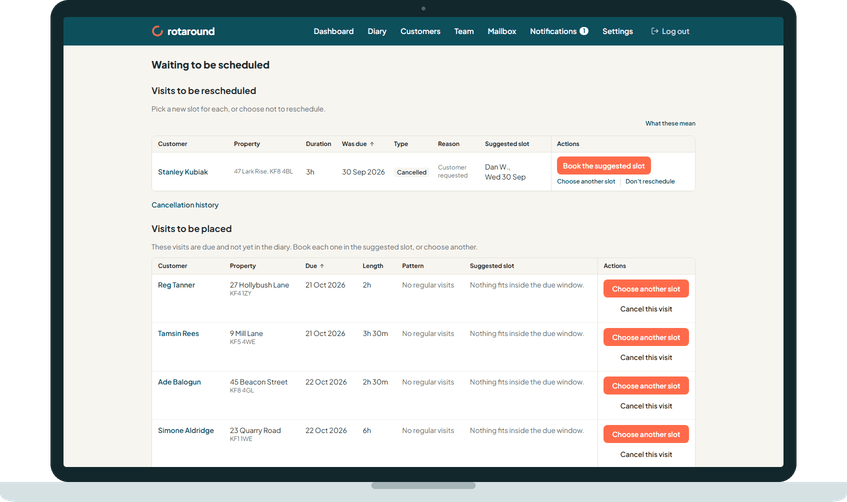
Waiting to be scheduled is one page with two lists. Visits to be rescheduled holds visits that were cancelled or missed and still need a decision or a new slot. Visits to be placed holds visits that are due but not yet on the diary. Each visit comes with a suggested slot where one fits.
When to use it#
Open it whenever the dashboard or the diary says visits are waiting. It is not in the menu. You reach it from the card on the dashboard, or the To do card on the diary, which says how many visits are waiting and how many are to be rescheduled and to be placed.
How to do it#
- Press the waiting card on the dashboard or under To do on the diary.
- Under Visits to be rescheduled, decide each cancellation with Reschedule or Don't reschedule, and book each visit on the list with Book the suggested slot or Choose another slot.
- Under Visits to be placed, check each visit's due date and Suggested slot. A red Was due means the visit is already overdue.
- Press Book the suggested slot to place it there, or Choose another slot to pick a day yourself.
- If a due visit should not happen at all, press Cancel this visit (Cancel this job for a one-off job).
What your customer sees#
Nothing while the visit waits. Once it is booked, the customer is emailed the day and the morning or the afternoon, as with any visit, if your visit emails are on. They are never given a clock time.
What happens next#
A booked visit leaves the list and sits in the diary in its slot. A visit you close with Don't reschedule leaves the list and is recorded as Not rescheduled. When nothing is waiting, the page says so.
Good to know#
Why a visit lands on Visits to be placed:
- In automatic mode ("Let the diary plan itself"), the planner could not find room for the visit within its due window, up to the end of the planned weeks. A confirmed visit left with no team member also lands here.
- In self mode ("I place visits myself"), every due visit you have not placed yet is here. A customer with a regular slot has their visits placed for them.
- In either mode, a one-off job added with Add to Waiting to be scheduled, or one left to the diary that found no room.
Why a visit lands on Visits to be rescheduled:
- It was missed: its due window ended and it was never placed. The reason says there was no room that week, the team member was on leave or, in self mode, it was not placed before its due window ended. You are told when a visit is missed.
- It was cancelled with Add to Waiting to be scheduled ticked, or you pressed Reschedule later.
- It was cancelled and nothing has been decided yet.
Other points:
- The suggested slot may say it uses flex, or that it fits if one other visit moves. When nothing fits it says Nothing fits inside the due window.
- Closer than usual to this customer's other visit that week. warns that the slot sits near another visit for the same customer.
Related articles#
Not what you needed? Contact us and say what you were trying to do.