What it is#
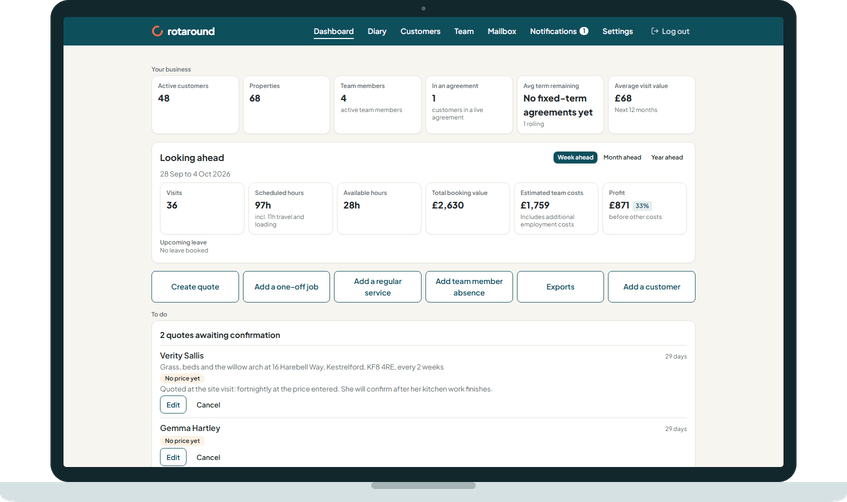
The dashboard is the first page you see when you sign in. It gives you the state of your business and what needs doing, in one place. From the top, it shows:
- Your business: six figures about your business as it stands.
- Looking ahead: the work, hours, value and profit for the week, month or year ahead.
- The six quick buttons.
- To do: the things waiting for you.
- The calendar.
- Missed visits and cancellations.
- Get started, until your setup is done.
When to use it#
Open it at the start of each day. Anything that needs you appears under To do. Anything that went wrong recently appears under missed visits and cancellations.
How to do it#
- Press Dashboard in the main menu.
- Read Your business. Its six cards are Active customers, Properties, Team members, In an agreement, Avg term remaining and Average visit value. These cards do not link anywhere.
- Read the calendar. It is the same diary calendar as the Diary page, in a short form without the Diary's controls.
- Under Missed visits and cancellations, check each row's status. Press See all missed visits and cancellations for the full list.
- If Get started shows, work through its three steps: Set up your account, Add your team, include yourself if you work on site, and Add a customer, or import your customer list.
What your customer sees#
Nothing. The dashboard is for you only.
What happens next#
The figures change as your business changes. Average visit value is the true average over the next 12 months, in whole pounds and without VAT, with "+ VAT" beside it while you are registered. Avg term remaining covers fixed term agreements, and counts rolling agreements separately.
The missed visits and cancellations card hides when there is nothing to list. On a desktop it is a table with the customer, property, service, status, value, team member, reason, and whether the visit was charged and the customer emailed. On a phone each row is a short card.
Get started disappears once all three steps are done.
Good to know#
- Each To do card hides when it has nothing to show, and the whole section hides when every card is empty.
- Looking ahead has its own article, which explains how the profit is worked out.
- The dashboard is the same in automatic mode and self mode, except for one To do card that shows only in self mode.
Related articles#
Not what you needed? Contact us and say what you were trying to do.