What it is#
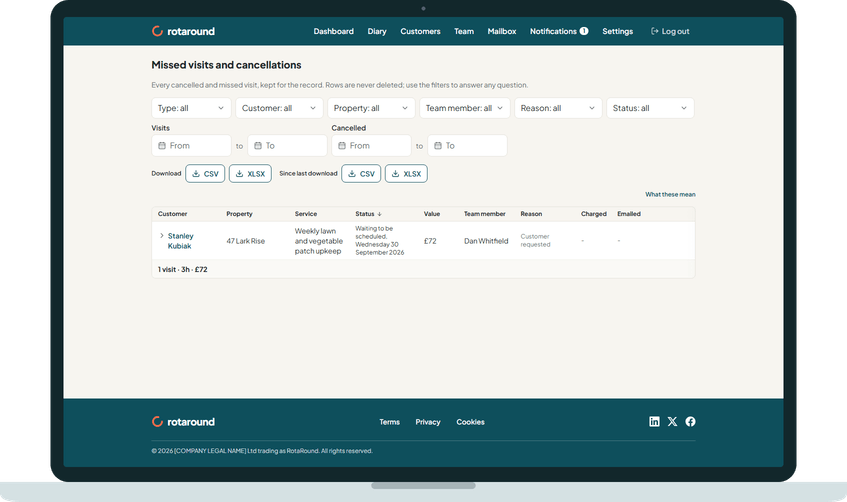
Missed visits and cancellations is the record of every visit that did not go ahead. Each row shows the customer, property, service, status, value, team member, reason, whether it was charged and whether the customer was emailed. Open a row to see its type, duration and the day it was cancelled.
A visit is one of two types. Cancelled means you cancelled it. Missed means its due window ended and it was never placed.
When to use it#
Use it to see what has been lost and why, to check who was charged or emailed, to put a visit back on the list for rebooking, or to download the record.
How to do it#
- On the dashboard, find the Missed visits and cancellations card and press See all missed visits and cancellations.
- Narrow the list with the filters: Type, Customer, Property, Team member, Reason and Status, and the date ranges Visits from and Visits to, or Cancelled from and Cancelled to.
- Press What these mean to read what each status means.
- To book a visit again, press Reschedule on its row. It goes onto Waiting to be scheduled.
- To keep a copy, press Download for the whole list, or Since last download for rows added since you last downloaded, as CSV or XLSX.
What your customer sees#
Nothing. This is for you only. The customer only sees the emails you chose to send when you cancelled or rebooked the visit.
What happens next#
Each row's status changes as you act on it, with the date beside it. Pressing Reschedule moves the row to Waiting to be scheduled. When the visit is booked, the row becomes Rescheduled.
Good to know#
The statuses are:
- Cancelled: the visit was cancelled and nothing has been decided yet. It is on Waiting to be scheduled, with Reschedule and Don't reschedule.
- Rescheduled: a new visit was booked. The date is its new day.
- Not rescheduled: you pressed Don't reschedule, so no new visit will be booked.
- Waiting to be scheduled: the visit is on Waiting to be scheduled, waiting for a new slot.
- Reopened: the cancelled day was reopened and the visit put back. It stays here for the history and counts in no total.
Other points:
- Missed is a type, not a status. A missed visit has one of the statuses above.
- Reschedule shows on Cancelled and Not rescheduled rows, and on missed visits that are not already on the list.
- A visit is missed in automatic mode ("Let the diary plan itself") when no room could be found before its due window ended. In self mode ("I place visits myself") it is missed when you did not place it before its due window ended.
- When nothing has been cancelled or missed, the page says so.
Related articles#
Not what you needed? Contact us and say what you were trying to do.