What it is#
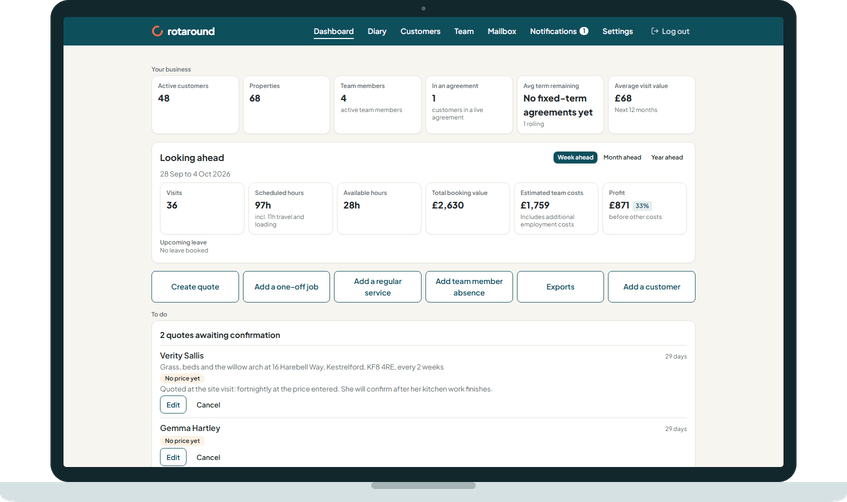
Before the work arrives you want to know whether your team has room, and whether the work pays. Looking ahead is the dashboard card that tells you. It sits under Your business.
When to use it#
Check it each week to see how full the week is, and each month to see how the coming weeks look. Check the year when you plan hiring or prices.
How to do it#
- On the dashboard, find Looking ahead.
- Choose Week ahead, Month ahead or Year ahead. The dates covered show on the card, for example "28 Sep to 25 Oct 2026".
- Read the six tiles, in order:
- Visits: how many visits are booked.
- Scheduled hours: the visit time plus travel and loading. For the week it also shows flex used and time overloaded.
- Available hours: the hours your team has in the period.
- Total booking value: the value of the visits, without VAT.
- Estimated team costs: including additional employment costs.
- Profit: booking value minus team costs, before your other costs, with a margin badge.
- Read the lines under the tiles. For the week and the month, Upcoming leave lists who is on leave and when. Press a line to open that team member's absences.
What your customer sees#
Nothing. This is for you only.
What happens next#
The card updates as the diary changes, and remembers your choice of range on this device.
The lines under the tiles tell you about anything the tiles do not show plainly: charged cancellations in the booking value, with no hours or pay counted, and, for the month and year, visits beyond the planning window that have no room yet.
Good to know#
- Month ahead is 28 days from today, not a calendar month. Week ahead is 7 days and Year ahead is 366 days, each starting today.
- Only placed visits count for the week and the month. In self mode ("I place visits myself"), visits waiting to be placed are left out until you place them. In automatic mode ("Let the diary plan itself"), the diary places them at its planning pass.
- If travel time is off, Scheduled hours counts loading time only.
- Profit shows red when it is below zero.
- How the costs are worked out is set out in the article on the profit card.
Related articles#
Not what you needed? Contact us and say what you were trying to do.