What it is#
The dashboard shows a card such as "3 visits waiting to be scheduled", and you want to know why they are there.
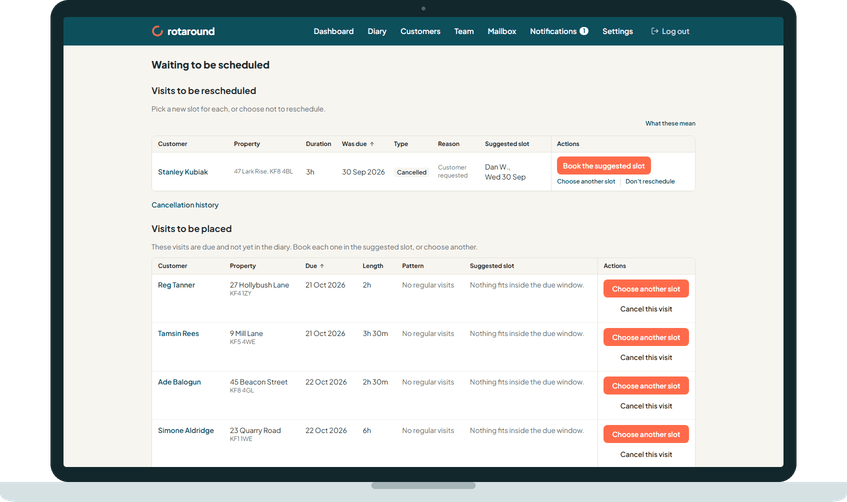
The short answer: a visit is waiting either because it is due and not yet on the diary, or because it was cancelled or missed and needs a new slot. In self mode ("I place visits myself") every due visit waits here until you place it, unless a regular slot places it for you. In automatic mode ("Let the diary plan itself") a visit waits only when the diary could not find room for it.
When to use it#
Use these checks when a visit is on Waiting to be scheduled and you expected it to be on the diary.
How to do it#
- Open the page from the dashboard card. It has two lists. Note which one the visit is on.
- On Visits to be placed, check your mode in Settings under Scheduling, Who places the visits:
- I place visits myself: the visit is due and you have not placed it yet. This is how self mode works.
- Let the diary plan itself: the diary found no room within the visit's due window. Look at the Suggested slot column. "Nothing fits inside the due window." means every day in that window is full.
- Also on Visits to be placed: a one-off job you added with Add to Waiting to be scheduled, or one left to Let the diary place it that found no room within the days you gave.
- On Visits to be rescheduled, look at the Type column. Missed means its due window ended before it was placed. Cancelled means it was cancelled with Add to Waiting to be scheduled ticked, or Reschedule was pressed later.
- A cancelled visit with nothing decided yet also shows here, with Reschedule and Don't reschedule.
- To clear a visit, press Book the suggested slot, Choose another slot, or Don't reschedule.
What your customer sees#
Nothing while the visit waits. When you book it, the customer can be emailed the day and the morning or the afternoon, never a clock time.
What happens next#
A booked visit leaves the list and goes on the diary where you put it. A visit that waits past the end of its due window is recorded as missed and moves to Visits to be rescheduled, and you are told A visit was missed.
Good to know#
- In automatic mode, adding hours or flex for a team member, or ending leave early, can make room at the next planning pass.
- A new booking for a cancelled visit replaces that one visit only. The customer's regular visits are untouched.
- Waiting to be scheduled is not on the menu. The way in is the card on the dashboard or the diary.
- In self mode, answering Yes, every visit when you place a customer's first visit sets a regular slot, so their later visits place themselves and stop landing here.
Related articles#
Not what you needed? Contact us and say what you were trying to do.