What it is#
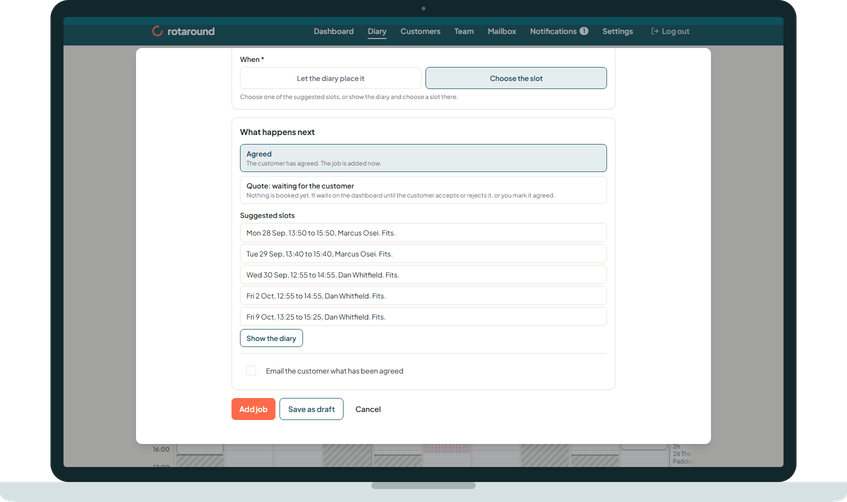
When you choose a slot yourself, the app looks through the diary and lists the next five slots that can take the booking, soonest first. Each one gives the day, the start and end times, the team member and a verdict, so you can pick one with a single tap.
When to use it#
Use it whenever you choose the slot for a one-off job, book a customer again, find a new slot for a visit on Waiting to be scheduled, or reschedule a visit. It saves you reading the whole diary to find a gap.
How to do it#
- In the sheet, choose Choose the slot. For a waiting visit, press Choose another slot. For a past visit, press Book again.
- Wait while the sheet shows Looking for the next free slots...
- Read the list under Suggested slots. Each row ends with its verdict:
- Fits. There is free time in the team member's normal hours.
- Needs flex. It fits only if the team member starts earlier or finishes later that day, or it runs past the end of the day.
- Moves one visit. It fits if one other visit moves sideways. This is offered only for a visit that already exists, never for a new job.
- A row that also says Outside the usual window. falls outside the customer's usual times.
- Tap the row you want. The sheet shows the chosen slot on one line with Change next to it, and a Start time you can adjust.
- Press the sheet's main button to save.
If nothing is found, the sheet says Nothing fits in the next few weeks. Show the diary to choose a day yourself. Press Show the diary and choose a day there.
What your customer sees#
Nothing while you choose. When the booking is confirmed, the customer gets an email with the day and whether to expect you in the morning or the afternoon, never a clock time.
What happens next#
The slot you pick is booked when you press the sheet's main button. A slot you choose by hand is pinned, and the planner does not move it. If the row said Moves one visit., that other visit moves as well.
The team member sees the booking on their page with its clock time. If it is today or tomorrow, they are emailed straight away.
Good to know#
- The order is: every slot that fits in normal hours (including one that fits by moving one visit) comes before any slot that needs flex. Then slots inside the usual window come first, then by day, verdict, the preferred team member, start time and name.
- A slot is left out if the booking would run into a visit or a break.
- A slot today never starts earlier than a short time from now.
- Flex hours are set per team member in Team, on their hours.
- Suggested slots work the same in automatic mode ("Let the diary plan itself") and self mode ("I place visits myself").
Related articles#
Not what you needed? Contact us and say what you were trying to do.