What it is#
A group email is one email written once and sent to many people. Each person gets their own copy, with their own name filled in, under your business branding.
When to use it#
Use it to tell customers about a change to your service, a holiday closure or a new service, or to send the whole team the same message.
How to do it#
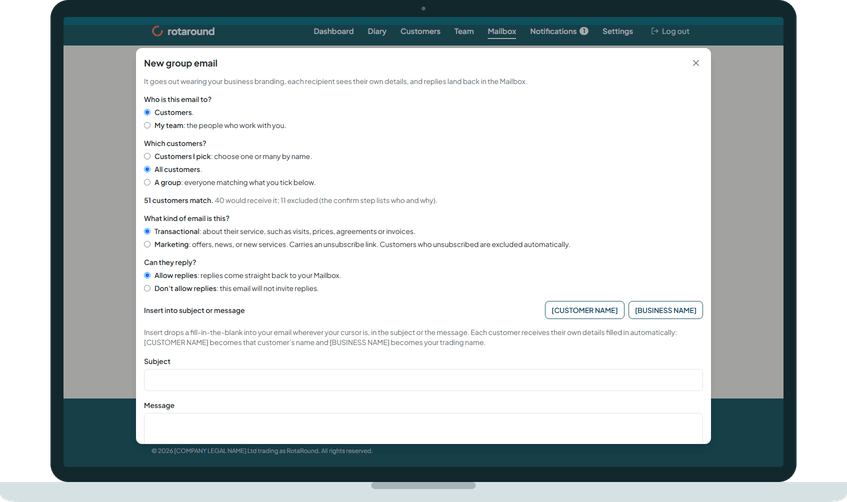
- In the Mailbox, press New group email.
- Under Who is this email to?, choose customers or your team.
- For customers, under Which customers?, choose one of these:
- pick them by name;
- all customers;
- a group. Tick a Status (Quote pending, Live or Past) and an Agreement choice (In a live agreement or Not in an agreement). The count below shows how many match.
- Under What kind of email is this?, choose transactional (about their service) or marketing (offers, news or new services). Marketing carries an unsubscribe link.
- Under Can they reply?, allow replies to come back to your Mailbox, or not.
- Write the Subject and Message. Use [CUSTOMER NAME] and [BUSINESS NAME] to fill in each person's details. The Preview shows the email as it will send.
- Under When should it send?, send it now or schedule it for a later day.
- Press Send a test to me to see it in your own inbox first.
- Press Check and send (or Check and schedule). Under Check before sending, read who will receive it and who is excluded and why. Press Show the list to see every name. Then press the final button to send.
What your customer sees#
An email from your business with your header, colours and footer, addressed to them by name, and a button to open their page. A marketing email ends with a line to unsubscribe.
What happens next#
The send shows in the Outbox as one row. Press it to see each person's row and whether it went. A scheduled email waits under Scheduled until it goes. If a scheduled send fails, you are told and it tries again.
Good to know#
- Customers who unsubscribed from marketing are left out of marketing emails automatically. Transactional emails still reach them.
- Customers with no email address, and sample customers, are left out and listed with the reason.
- Who receives a scheduled email is worked out when it sends, so anyone who matches by then is included.
- Team emails are always about work: there is no marketing choice for them.
- To stop saving your writing, press Cancel. To keep it, press Save draft.
- Group emails work the same in automatic and self mode.
Related articles#
Not what you needed? Contact us and say what you were trying to do.