What it is#
The Mailbox holds every email sent or received for your business. Sent emails are kept permanently with their exact contents. Your own alerts are not here: they are on the Notifications page.
When to use it#
Use it to read customer replies, check what a customer was sent, see whether an email arrived, or write a new email.
How to do it#
- Press Mailbox in the main menu. A red dot shows while something received is unread.
- Choose a view:
- Inbox: replies and emails from customers and team members.
- Outbox: everything your business has sent.
- Drafts: emails you saved and have not sent.
- Scheduled: emails set to send later. Press Cancel this send to stop one, or open it to change it.
- To find a message, type in the search box (a customer, property, email address or subject), or narrow the list with Audience, Name, Property, Agreement, Type and Dates. Press Clear filters to start again.
- Press a row to open the message. The details show who it went to, when, and the customer, property, agreement or visit it belongs to. Messages in the same conversation are listed under In this thread, newest first.
- To answer a customer or team member, press Reply on a message they sent. Write, then press Send reply.
- To write a new email, press New email, choose Customers or My team, tick who it is for, write the Subject and Message, and send it now or schedule it.
- In the Inbox, press Mark all read to clear the unread dots.
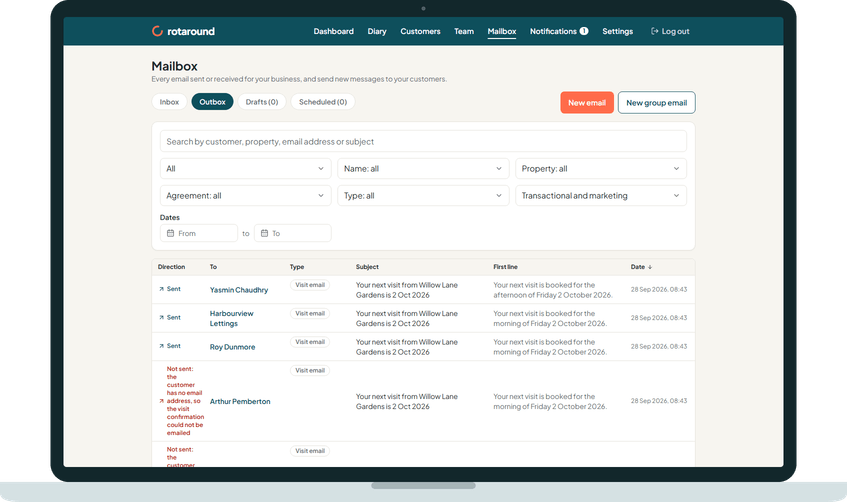
On a phone, New email is the main button and the other views are in the More menu. Inbox and Outbox are chosen with Showing in the filters.
What your customer sees#
Your email, with your branding, from your trading name. When replies are allowed, a customer's reply comes back into your Inbox in the same thread.
What happens next#
A group send shows as one row, Sent to so many people. Press it to see each person's own row. A reply from an address that is not on the customer's record is marked Unrecognised sender.
Good to know#
- Opening a message marks every received message in its thread as read.
- A draft is only saved when you press Save draft. There is no autosave.
- Each customer and team member record has its own list of emails with them, with a link to the full thread in the Mailbox.
- There is no way to attach a file to an email you write.
- The Mailbox works the same in automatic and self mode.
Related articles#
Not what you needed? Contact us and say what you were trying to do.