What it is#
A team member's working hours are their usual week: which days they work, when they start and finish, how long they take for lunch and breaks, and roughly when the break falls. The diary plans visits inside these hours. Flex is extra time either side of the day that is used only when a visit cannot otherwise fit.
When to use it#
Set the hours as soon as you add a team member, because they cannot be given visits until you do. Change them when their usual week changes. For a single extra day use one-off hours, and for time off record an absence.
How to do it#
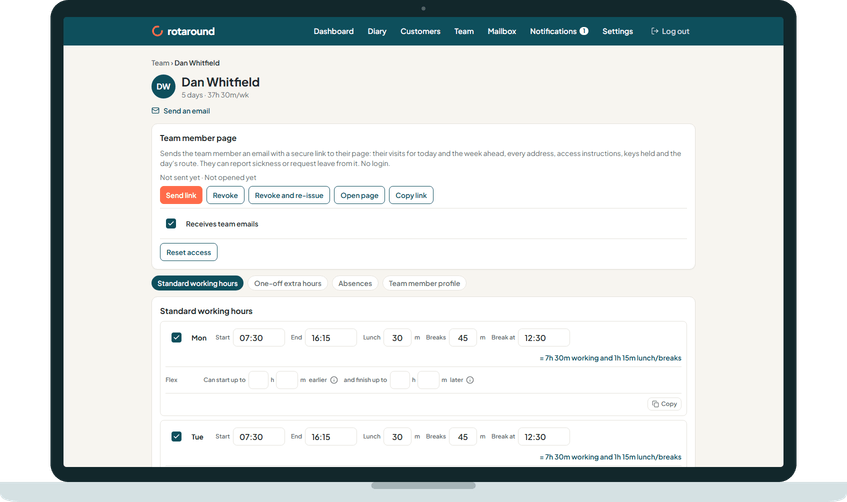
- Open Team, press the team member's name and choose the Standard working hours tab.
- Tick each day they work. For each day, set Start, End, Lunch and Breaks in minutes, and Break at for when the break should fall. The line beside the day shows the working time and the lunch and breaks.
- On the Flex row under a day, set how much earlier they Can start up to and how much later they can finish. Leave both at nothing if they have no flex that day.
- To give other days the same hours, press Copy under a day, tick the days to fill and press Apply.
- Under Starts the day from, choose Home or The depot.
- Press Save working hours.
What your customer sees#
Nothing directly. The hours decide which days and slots can be offered for their visits. Customers are only ever told the day and the morning or the afternoon.
What happens next#
Saving the hours starts a new planning pass, which uses the new pattern. The coming week card on the same tab shows what the next seven days look like with these hours.
The team member's page shows the days they do not work as non-working. Their team emails follow the same pattern: the daily email is sent only on their working days.
Good to know#
- A newly ticked day starts at 08:00 to 16:00, with 40 minutes lunch, 20 minutes breaks and the break at 12:30. Change any of them.
- Lunch and breaks are one break block. The diary places it between visits inside the break window set in Settings, under The diary, as near to Break at as the day allows. You can drag it on the diary.
- Flex is at most 4 hours each side. Work is planned inside normal hours first, and a day only starts earlier or finishes later when a visit or job cannot otherwise fit.
- Shortening a pattern can leave days with more work than time. Those days show as overloaded on the diary until you move a visit or add hours.
- A crew's hours are the hours its members share, so changing a member's hours changes the crew's too.
- The hours work the same way in automatic mode ("Let the diary plan itself") and self mode ("I place visits myself"): they are the time the diary has to fill, whoever places the visits.
Related articles#
Not what you needed? Contact us and say what you were trying to do.