What it is#
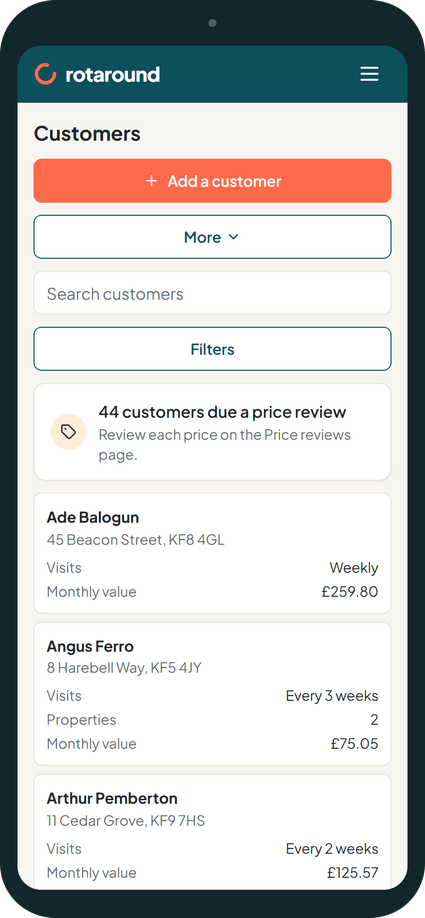
The Customers page lists every customer, one row each. A customer with more than one property expands into lighter property rows beneath. Above the list are a search box and a row of filter boxes, and each column header has a sort menu. On a phone, customers show as cards and the filters sit in their own sheet.
The columns are Name, Properties, Visits, Monthly value, Contact, Customer since, Price reviewed, Next review and Agreement.
When to use it#
Use search to find one customer quickly. Use the filters to answer a question about many: which customers have a price review due, who is in an agreement, who has not had regular visits, or who joined this year.
How to do it#
- Press Customers in the menu.
- Type in the search box. It searches by name, property, postcode or email.
- Narrow the list with the filter boxes. Each one shows its choice as "Label: value":
- Status: Quote pending, Paused, Past customers, Archived or All. The list starts on active customers.
- Agreement: In an agreement, No agreement, Review due or Ending within 3 months.
- Price review: Due or Not due.
- Visits: Weekly, Every 2 weeks, Every 3 weeks, Monthly or No regular visits.
- Team member: one team member's customers.
- Joined from and Joined to: a date range.
- VAT: Exempt shows only customers marked VAT exempt.
- Open a column header's menu to sort by that column.
- Press Expand all to show every property row, or Collapse all to hide them.
- Press Clear filters to go back to the full list.
On a phone:
- Press Filters under the search box. When filters are on, it shows how many.
- A full-screen sheet opens with the same filter boxes and Sort customers.
- Press Show results to see the list, or Clear filters to start again.
What your customer sees#
Nothing. This is for you only.
What happens next#
The list shows only the customers who match. If none do, it says No customers match these filters. Opening a customer takes you to their record. The Next review column shows Due as a link to the price review or agreement review for that customer.
When the list is filtered to price reviews that are due, each row can open Review price rise. You can also tick the customers whose price you are keeping and press Mark reviewed, holding price.
Good to know#
- A badge beside a name shows Quote pending or that the customer is paused.
- A property row shows the property's nickname in brackets, unless the nickname is "Home".
- If you are VAT registered, Monthly value carries a + VAT mark.
- Ended customers are under Past customers, and archived customers under Archived.
- Export downloads the list, and Import brings in customers from a spreadsheet. On a phone, both are under More.
- The list is the same in automatic mode and in self mode.
Related articles#
Not what you needed? Contact us and say what you were trying to do.