What it is#
RotaRound turns your completed visits into invoice lines for your accounting software. It does not send invoices to customers. You download the file on the Exports page and upload it to your accounting software, which sends the invoices.
Each visit is one line. A line reads, for example: "Window cleaning at 12 High Street, Anytown. Visit on Monday 15 June 2026, morning, by Sam." It gives the morning or the afternoon, never a clock time.
When to use it#
Read this before your first download, and when you set how a service is invoiced.
How to do it#
- On the customer's record, open the service and set Invoicing: Invoice after each visit, with how many days after the visit, or Invoice at the end of each month. Press Save property.
- In Settings, under Payment terms, set how many days every customer has to pay, and press Save payment terms. It is 14 days unless you change it.
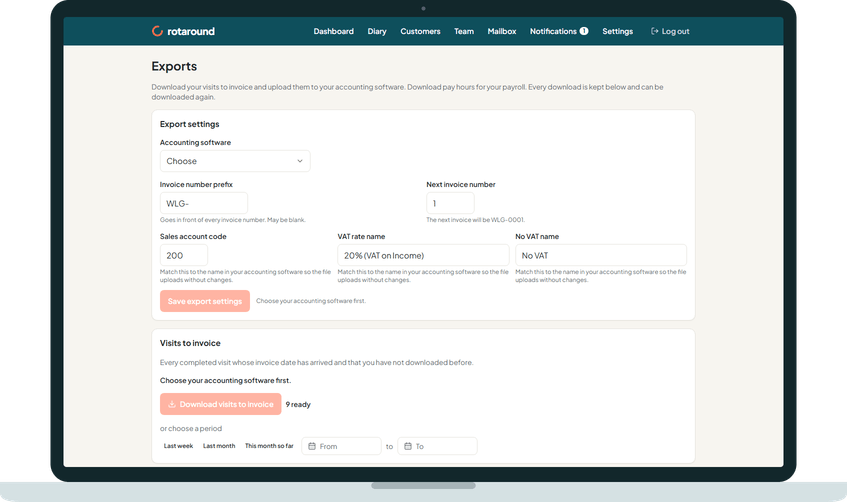
- On the Exports page, under Export settings, set your Invoice number prefix and Next invoice number, and press Save export settings.
- Under Visits to invoice, press Download visits to invoice.
What your customer sees#
Nothing from RotaRound. The customer gets the invoice your accounting software sends. Each line names the property, the day and the morning or the afternoon.
What happens next#
The download includes every completed visit, and every cancellation you charged for, whose invoice date has arrived and which is not on an invoice yet. A visit today counts once its part of the day has ended. Cancellations you did not charge, missed visits and visits not yet placed are never included.
The invoice date is set per service:
- After each visit: the visit date plus the days you chose. Each visit is its own invoice.
- At the end of each month: the last day of the month. All the customer's month end visits, across all their properties, share one invoice, with the reference "Several properties".
The due date is the invoice date plus your payment terms.
Numbers are given when an invoice is first downloaded, in invoice date order and then by customer name, starting from your next invoice number. From then on the invoice is stored and never changes. Downloading it again gives exactly the same lines.
If a visit changes after its invoice was downloaded, it is listed under Changed since invoiced for you to correct in your accounting software.
Good to know#
- VAT on each line is the rate in force on the visit's date, worked out per line to the penny. A VAT exempt customer's lines have none.
- Accounting reference on the customer's record is their reference in your accounting software, if it uses one.
- An invoice downloaded long ago may still show a clock time on its lines, because stored invoices never change.
- Nothing here differs between automatic mode and self mode.
Related articles#
Not what you needed? Contact us and say what you were trying to do.